
Taption is an AI platform designed for traditional Chinese and multilingual audio-visual workflows, offering features such as speech-to-text, video transcription, verbatim scripts, and subtitle translation. Since its development began in 2020, founder Jay has revealed that Taption has accumulated over 100,000 registered users, with the product being applied in the professional audio-visual workflows of major media and film distributors in Taiwan. Jay points out that while AI speech recognition technology has advanced rapidly, "converting speech to text" and "producing truly usable transcripts and subtitles" are two different matters. This realization has led them to focus on language details, subtitle editing, and a complete audio-visual workflow.

Complete Solution for Audio-Video Production
Taption's design philosophy goes beyond merely enabling AI to recognize spoken content; it aims to make the generated transcripts and subtitles easier to read, edit, translate, and use. Jay emphasizes that especially when dealing with languages like traditional Chinese, Japanese, and Korean, even if the text recognition is accurate, subtitles may still be difficult for viewers to read due to unnatural breaks, inappropriate punctuation, or timing issues. This is why Taption not only values AI speech recognition but also focuses on the quality of traditional Chinese and multilingual subtitles, as well as the complete workflow from transcripts to professional audio-visual production.
Features and Experience: Diverse Audio-Visual Processing Tools
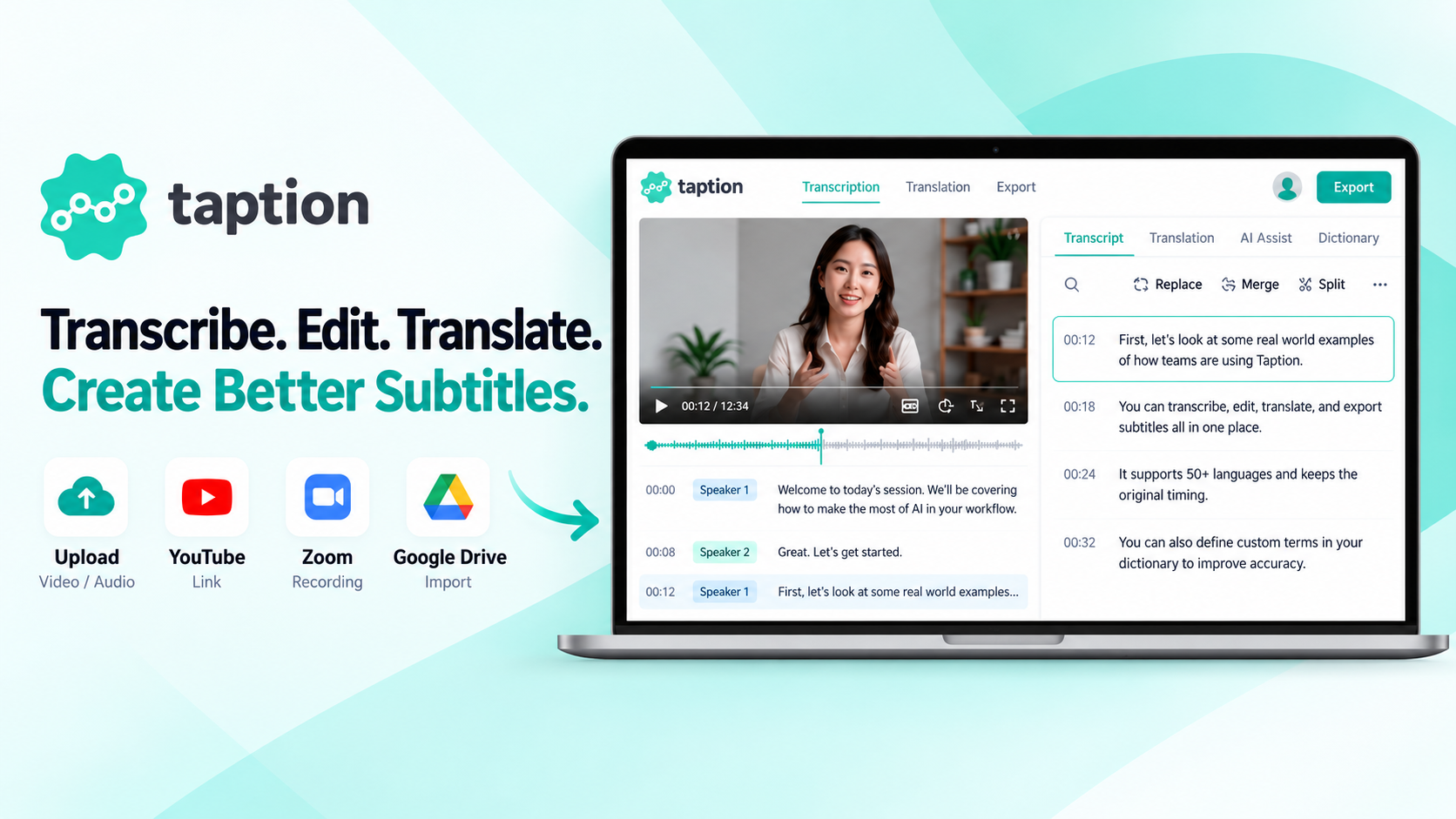
Taption offers multiple features that allow users to easily handle audio-visual content. First, the AI speech-to-text and video transcription functions support common audio-visual formats such as MP3, WAV, MP4, and MOV, and can import content from supported sources like YouTube, Zoom, and Google Drive. The system automatically recognizes speech, adds punctuation and timestamps, generates editable transcripts, and provides speaker identification and tagging features, making it suitable for meeting notes, interviews, news reporting, classroom recordings, and podcast content organization.
Additionally, Taption has optimized its features for the textual characteristics of traditional Chinese, simplified Chinese, Cantonese, Japanese, and Korean, focusing on natural breaks, punctuation, reading length, and timing synchronization in subtitles, helping users reduce manual adjustments after AI-generated subtitles. Furthermore, Taption supports translation in over 50 languages, making it suitable for producing multinational audio-visual content and bilingual subtitles.
Pricing Strategy: Flexible Payment Options
Taption offers a freemium pricing model, allowing users to choose a billing method that suits their needs. New users receive 20 minutes of free transcription upon registration, with flexible options for purchasing based on usage, monthly subscriptions, and customized enterprise plans. Additionally, Taption provides solutions for corporate teams and customized plans to meet different user requirements.
Market Positioning and Competitive Analysis
Taption differentiates itself from competitors like Sonix (sonix.ai), Yating Transcripts, and Trint (trint.com) by not only focusing on AI speech recognition but also emphasizing the quality of traditional Chinese and multilingual subtitles, as well as the complete workflow from transcripts to professional audio-visual production. Developers stress that Taption's product focus is on integrating AI transcripts, subtitle timeline editing, multilingual translation, bilingual subtitles, a glossary of terms, and translation memory into a single workflow, making it particularly suitable for users who need to proofread repeatedly, produce multilingual versions, and deliver official subtitles.
Moreover, Taption offers a native plugin for Adobe Premiere Pro, allowing users to seamlessly integrate transcription, subtitle translation, and editing results into their editing timeline, reducing cross-platform operations and format conversions, which is especially important in professional audio-visual editing processes.
Getting Started: Simple and Easy Operation Steps
The process of using Taption is quite simple, with the following specific steps:
Step 1|Free registration for a Taption account: Visit the official Taption website https://www.taption.com/zh, register and log in to your account to receive 20 minutes of free trial credit without needing to purchase a subscription plan first.
Step 2|Upload audio, video, or import links: Select the audio-visual files you wish to process, such as MP3, MP4, WAV, or MOV, or import content via YouTube links or other supported sources. Whether it’s meeting recordings, interviews, podcasts, or videos, you can easily start processing.
Step 3|Select language and let AI automatically generate transcripts: Set the original language and start transcription; Taption will automatically recognize the speech content, generate a transcript with timestamps, and provide speaker identification features for easy organization later.
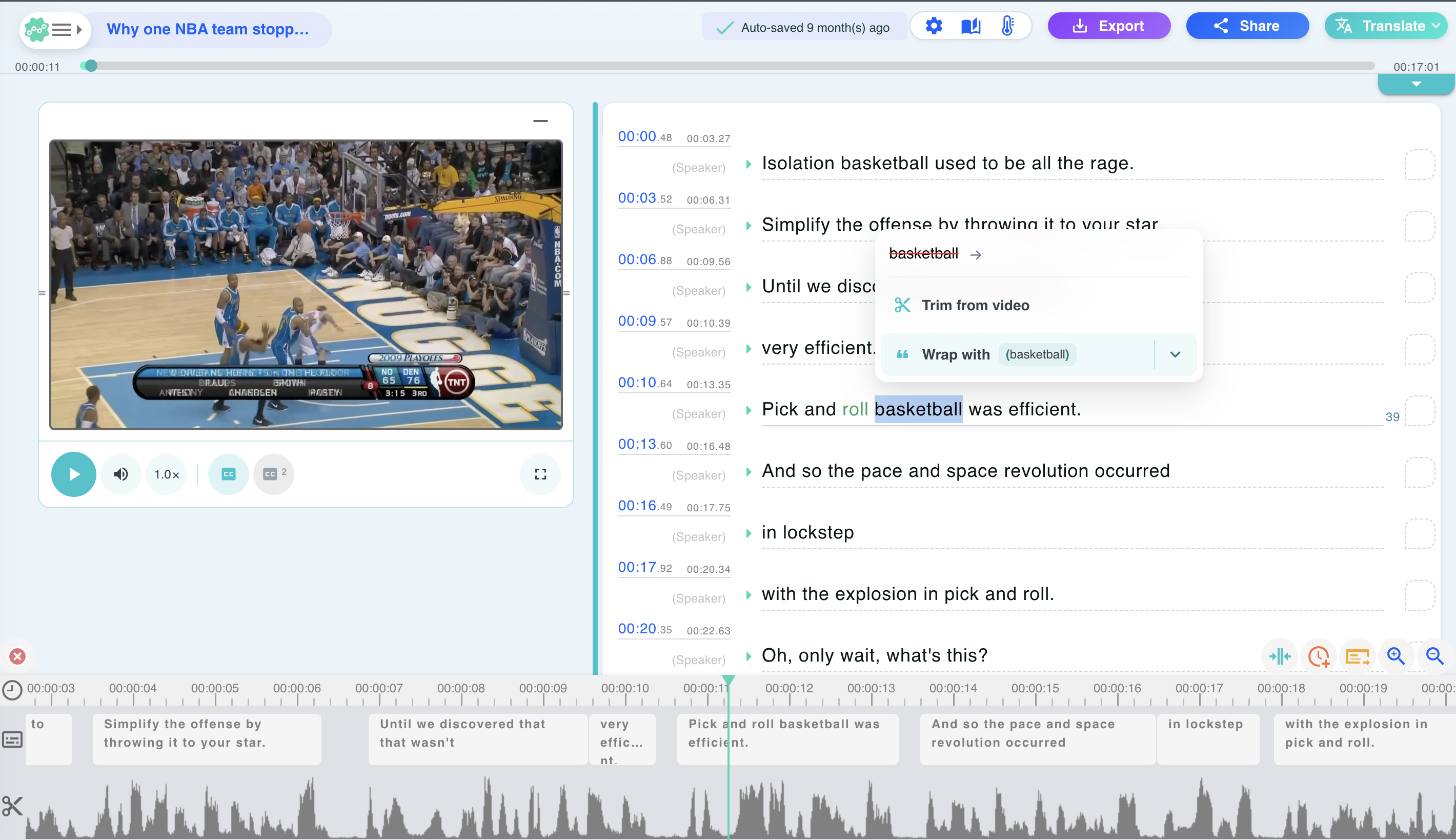
Step 4|Edit transcripts, generate subtitles, or translate: Use the online editor to play audio-visual content in sync while modifying the text. You can adjust subtitle segmentation, timelines, and terminology as needed, or translate the content into English, Japanese, Korean, etc., to create single or bilingual subtitles.
Step 5|Export transcripts, subtitles, or videos: After editing, you can download in formats such as TXT, SRT, VTT, PDF, or export videos with embedded subtitles in MP4 format. If using Adobe Premiere Pro, you can also integrate subtitles into your video editing workflow via the plugin.
Other Highlights and Additional Information
Since its inception in 2020, Taption has been dedicated to making AI speech-to-text and professional subtitle production easier to use. The product continues to improve based on the needs of actual audio-visual workers, enhancing subtitle readability, multilingual translation, timestamp adjustments, and terminology handling. Taption serves not only general content creators but has also been applied in the professional workflows of one of Taiwan's top five media companies and film distributors, covering media audio-visual content processing, transcript production, and film translation applications.
These practical experiences allow Taption to continuously optimize professional audio-visual workflows, with a particular focus on the readability of traditional Chinese and Asian language subtitles. Notably, Taption supports translation in over 50 languages and features AI subtitle segmentation, timestamp adjustments, a glossary of terms, and translation memory capabilities, making it competitive in the market.
Target User Groups
Taption is particularly recommended for users who need to handle traditional Chinese transcripts, produce multilingual video subtitles, frequently edit videos, or convert large amounts of audio-visual content into text information, including:
1. Content creators: Such as YouTubers and podcast creators, who can quickly generate transcripts, video subtitles, and multilingual translations to reach a broader audience.
2. Audio-visual editors and post-production teams: To produce naturally readable professional subtitles, reducing the burden of subtitle timing and format conversions.
3. Media and journalism professionals: To convert reporter interviews, news videos, and long recordings into transcripts with speaker identification for easier searching and organization.
4. Translation and film distribution professionals: To enhance the efficiency of multilingual audio-visual localization using subtitle timelines, bilingual comparisons, and translation memory features.
5. Enterprises and educational institutions: To convert meetings, online courses, and training videos into transcripts, summaries, and subtitles, facilitating knowledge preservation and sharing.
In the future, the Taption team is preparing to continue optimizing product features, enabling more users to easily handle audio-visual content and ensuring that quality content is no longer limited by language.
Product Name: Taption
Official Website: https://www.taption.com/zh
Supported Platforms: Web / API
Pricing: Freemium, offering free trials and flexible payment options (including pay-per-use, monthly subscriptions, and enterprise plans)
TechRitual 企業科技編輯部(香港)。biz.techritual.com 的外語版本由繁體中文原文翻譯。
